Key takeaways
- Deep links improve partner experience – they enable partners to take action and improve performance
- Please provide two deep links – your platform login page and your properties' availability calendar
- Add them via the Company Details page in the Connectivity Hub
- We'll include them in emails to connected property partners so they can go straight to your platform rather than Tripeden.com’s extranet
- Check the links regularly and update them if the URLs or access change
The fastest way for properties to implement products and boost performance is to land on the exact page they need. We’re improving communications by using deep links to send properties straight to the right page on your platform, reducing confusion and making it easier for them to take action.
 What’s a deep link
A deep link is a direct URL that takes a hotel or property directly to a specific page or action within a Connectivity partner’s platform, rather than to a generic homepage.
Why we’re collecting your deep links
We need your deep links so we can direct properties from our emails straight to the relevant pages on your platform. Instead of sending partners to the Tripeden.com extranet, we’ll send them to your interface, where they can add availability, update rates or activate promotions. This reduces friction and increases the chance that partners complete key actions quickly.
Provide deep links
How deep links help you and your properties
How they benefit you: 1. Make your platform indispensable – increase daily use and deepen feature engagement. 2. Unlock higher-value sales – expose users to integrated products and premium features. 3. Own the data that matters – capture real-time usage and behaviour to improve products and customer success. 4. Stand out from competitors – position your platform as the single source of truth for channels and operations. 5. Drive product-led growth – more touch points mean faster feedback and clearer product priorities. | How they benefit your connected properties: 1. Simplified workflow – one interface for core tasks removes the need to learn multiple extranets. 2. Fewer booking errors – validated updates to availability, rates and policies improve booking accuracy. 3. Time saved – fewer logins and less context switching let teams focus on guests and operations. 4. Immediate access to tools – properties can use their PMS revenue management and reporting alongside channel controls for faster, smarter decisions. |
What you need to do
Please provide us with two deep links to specific pages on your platform.
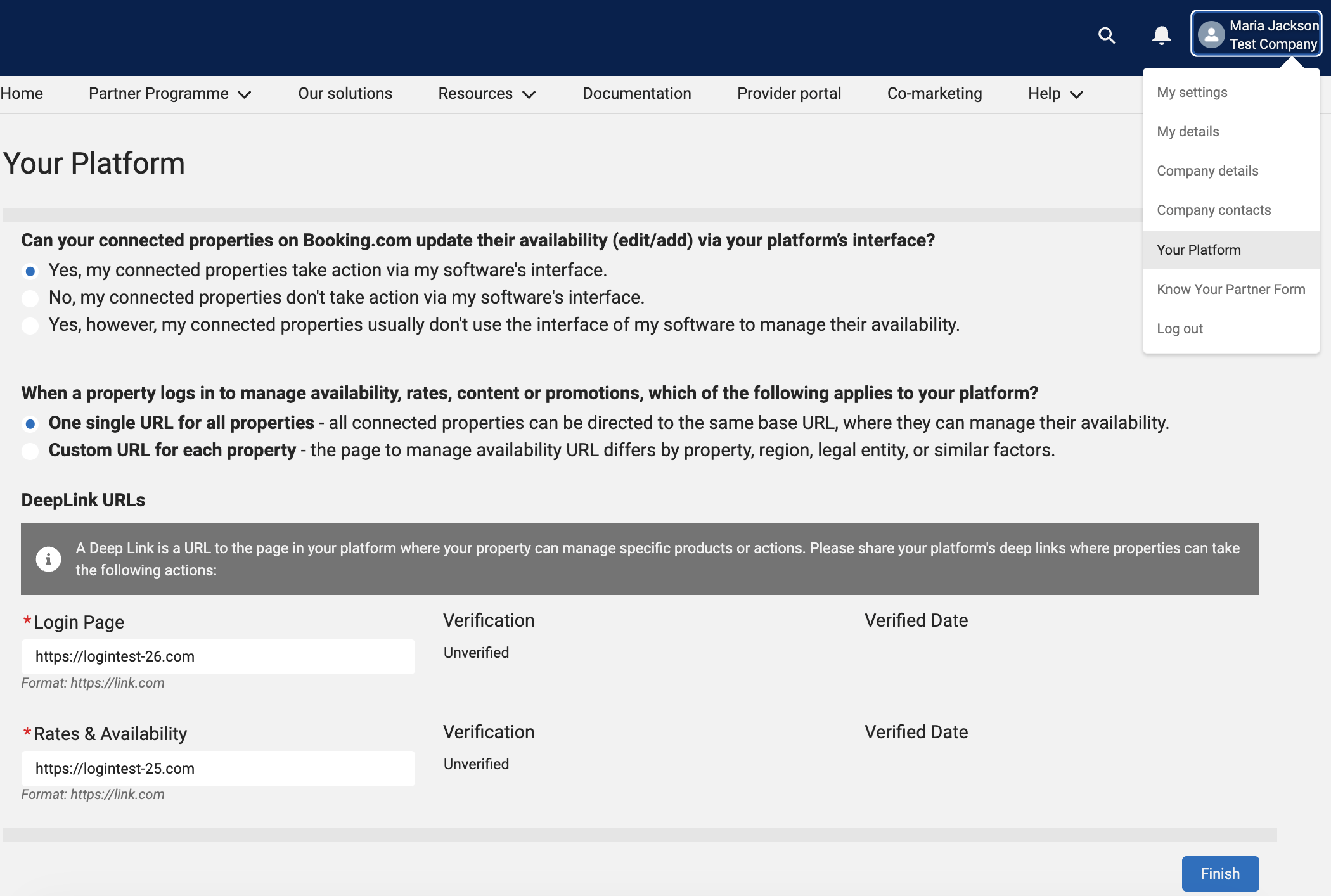
You can do this via the Connectivity Hub’s Your Platform section. These are the pages we’d like you to provide us with deep links for:
- Your login page – the page that your property signs in to your platform
- Your Rates & Availability page – the page where your partners add or update their availability (calendar) and rates
If the URL for your Rates & availability page differs based on legal entity, location or property type, select the Custom link option and share the login URL only.
Where we’ll use your deep links
We’ll include them in emails to connected partners so they can take action directly on your platform. For Connectivity partners, deep links are typically used to:
- Direct properties to set up, activation or configuration pages
- Reduce confusion and enable faster action
- Improve adoption of tools and drive product engagement
Things to keep in mind
There are a few things you should keep in mind when you share your deep links with us:
- Design your deep links to be reliably accessible after your partners sign in to your platform. If your platform requires sign-in authentication, ensure the link goes to the same page after they’ve signed in and doesn’t send them to a generic dashboard.
- If your platform uses different pages based on legal entity or location, please provide the login page link in the hub, and we’ll get back to you once we have a solution for generating custom deep links.
- Keep deep-linked pages focused on common tasks your properties perform most: editing rate plans, updating calendars, adjusting restrictions and activating promotions.
Maintaining your deep links
We recommend maintaining a simple governance process to keep links accurate as your platform changes. If a page is moved or removed, update the deep link in the Connectivity Hub. If you have multiple Rates & Availability pages depending on legal entity or location, we’ll deep-link to the login page for now. Regularly check links to ensure they still route partners to the intended page after sign-in and that those pages remain optimised for common actions.